Activate your
subscription
Enter the activation key you received after purchase to unlock your subscription.
We detect the product from the key — MasonLab keys look like PLUS-MASON…, PRO5X-MASON…, GO-MASON…
Step 1 of 41 / 4

ChatGPT
Plus / Pro / Go

Claude
Pro

SuperGrok
1 Month

Perplexity
Pro
ChatGPT
Choose the plan
Plus
1 month · tap to activate
Plus · 12
12 months · tap to activate
Pro
1 month · tap to activate
Go
1 month · tap to activate
Claude
Choose the plan
Pro
1 month · tap to activate
Enter Key
Paste your activation code below
Activation key
Paste session data
Follow the instructions to activate your subscription
1
Open chatgpt.com and log in to your account
2
Go to: chatgpt.com/api/auth/session
3
Select all text (Ctrl+A), copy (Ctrl+C)
4
Paste in the field below
1
In your browser, open chatgpt.com and log in
2
Open a new tab: chatgpt.com/api/auth/session
3
Long-press the text → Select all → Copy
4
Return to this page and paste below
First log in to ChatGPT, then open the link above
The account must have no active ChatGPT subscription (Free) — with an active one the key will not apply and is not spent.
This account already has an active Plus subscription. Force activation anyway? The current period will be overwritten.
Enter Organization ID
Copy your Organization ID from claude.ai settings
1
Open claude.ai and log in to the account that needs the subscription
2
Fresh account? First choose the Free plan and finish the short intro — otherwise Claude won't accept the activation
3
Go to Settings → Account
4
At the bottom find Organization ID and tap the copy icon next to it — don't retype it by hand
5
Paste it in the field below
Important: Take the ID from claude.ai settings — not from the Claude Developer Platform / console (that one looks like
org-… and won't work). Refunds are not possible if the wrong ID is used.Organization ID from claude.ai → Settings → Account
Enter User ID
How to get your User ID
1
Log in to grok.com
2
In the bottom-left corner open Settings → Account
3
Copy the User ID at the very bottom of the page
4
Paste it in the field below
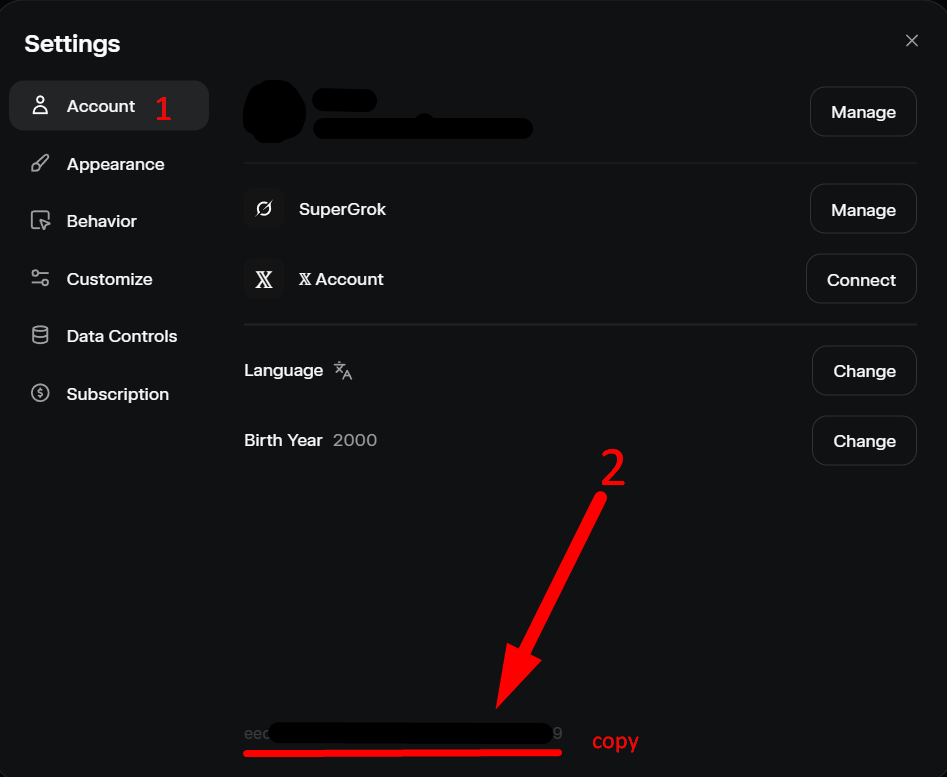
Important: Do not paste the User ID from x.com. We cannot issue refunds if the wrong ID is entered.
User ID from grok.com
Enter Account ID
How to get your Perplexity Account ID
1
Log in to perplexity.ai
2
Open perplexity.ai/api/auth/session in the same browser
3
Select all (Ctrl+A) and copy (Ctrl+C)
4
Paste it in the field below
Important: Make sure the account has no active Pro subscription. We cannot issue refunds if the wrong account is used.
Account ID from perplexity.ai